Welcome to Day 7 of the challenge.
On Day 5 you ran your bank statement through Claude Cowork and found subscriptions you’d forgotten. Cancelled some, kept some, flagged some as unsure. Money back.
You also hit a wall. The statement is brilliant at monthly subscriptions and useless at the annual ones. Apple, PayPal, Stripe, Amazon: they aggregate so many services that “APPLE.COM £79.99” tells you nothing about what you’re actually paying for.
The receipts that DO tell you live somewhere else. Your inbox.
Today we connect Claude to your inbox and let it sweep for what the statement couldn’t see.
A word before we start
This is your first connector. The shift is real.
Until now, Claude has worked with what you give it: typed text, attached files, your Cowork folder. Connectors flip that. You grant Claude access to a service (Gmail today, Calendar later, Drive later), and Claude can read it directly. No more copying, pasting or downloading.
That’s the unlock that takes Cowork from “useful assistant” to “actual colleague.” It’s also where Day 4’s permissions teaching earns its keep. Read-only first. Specific resources only. Disconnect when done. Same rules.
A note on Gmail specifically: if your primary inbox isn’t Gmail, the Outlook and other connectors work the same way. Skip the Gmail-specific clicks below and find the equivalent in your provider. Same brief, same payoff.
Step by step
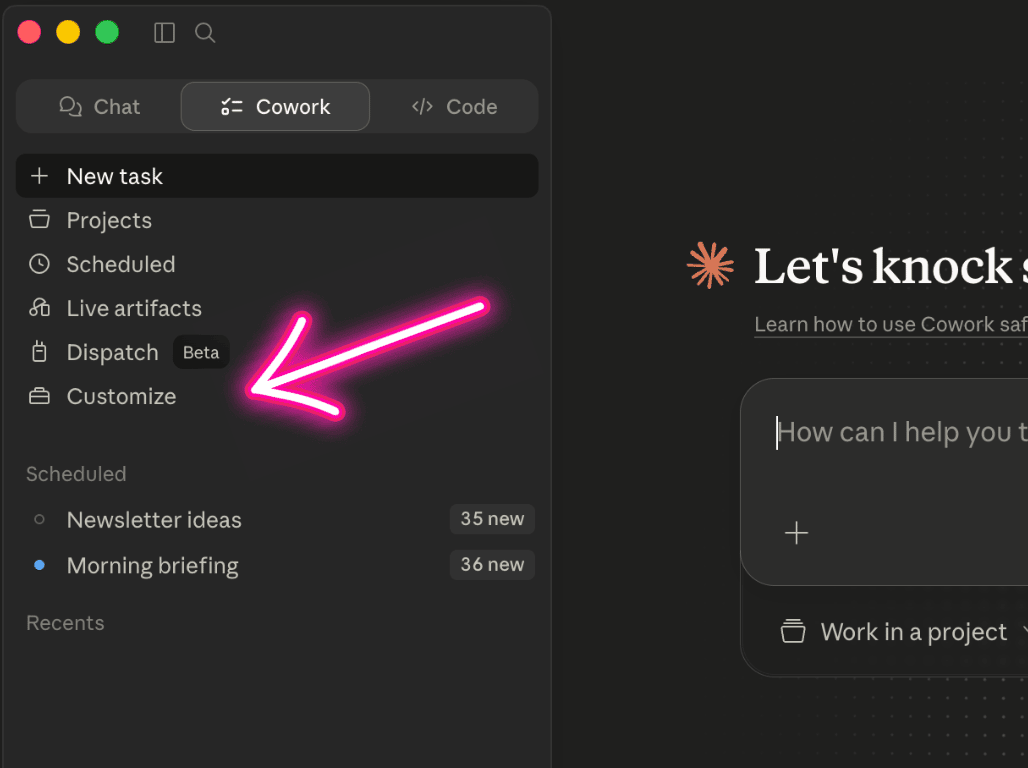
Step 1. Open Cowork in your desktop app.
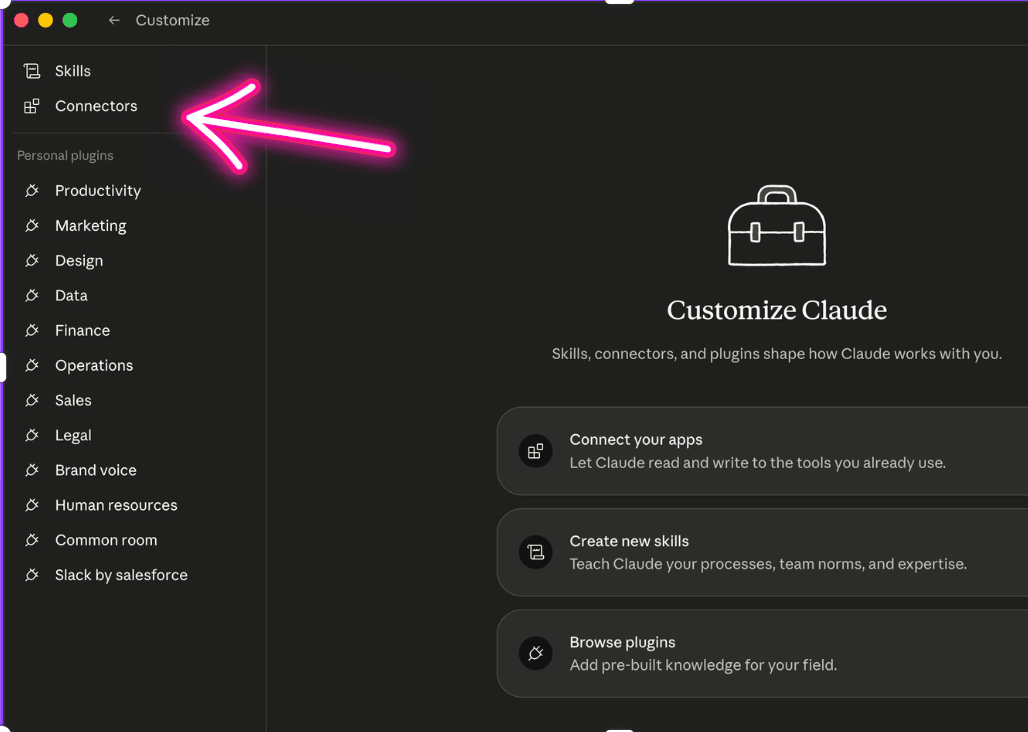
Click Customise or Settings.
Find Connectors (or Integrations depending on which version you’re on).
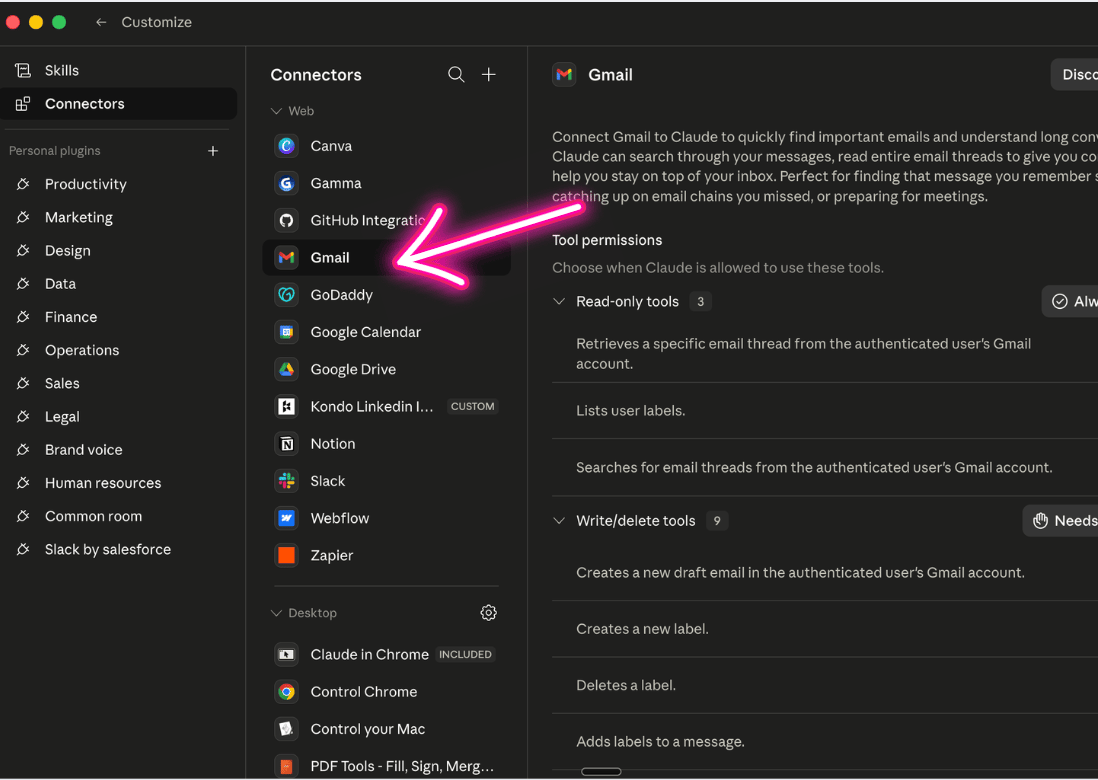
Step 2. Click Gmail. Sign in with your Google account.
Step 3. When Google asks what Claude can access, grant READ-ONLY access only.
Not “Read, compose, send, and permanently delete.” Just ‘Read-only’.
If the screen offers a choice, untick anything that lets Claude send mail, delete mail or modify your account settings.
Read-only is enough for today’s task and for almost everything you’ll ever ask Claude to do with your inbox.
If you only see “all of Gmail” as the access option, that’s fine for today.
We come back to label-level scoping (only granting access to specific Gmail folders) when we go deeper on connectors.
Step 4. Open your Day 5 Cancel-Subs table from your Cowork folder. Keep it visible.
Step 5. In a new Cowork chat, paste this brief:
Search my Gmail for emails from the past 13 months containing any of these phrases: “subscription”, “renewal”, “trial”, “thanks for subscribing”, “your payment”, “auto-renew”, “annual renewal”, “your receipt”.
From the results, identify every recurring subscription service. For each one, list: company name, what the service is, how often it bills (monthly, annual, quarterly), and the amount if visible.
Cross-check against the attached table from my Day 5 bank statement analysis. Tell me what’s in my inbox that’s NOT on the table. That’s what I missed.
Format as a clean list grouped by frequency. No em dashes, no double-hyphens in your reply.
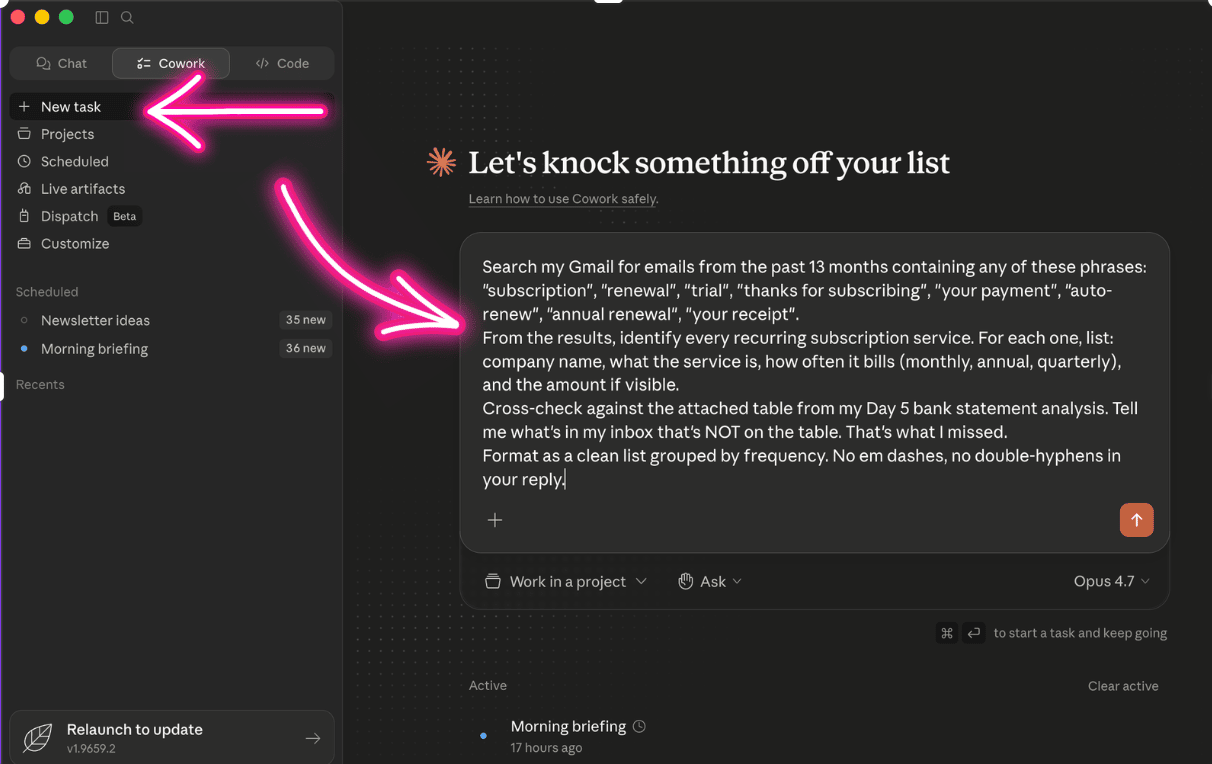
Step 6. Attach your Day 5 Cancel-Subs table. Send.
Step 7. Claude searches your inbox, cross-checks, and gives you a list of the subs the statement missed. Usually annuals. Often three to five new ones. Sometimes more.
Step 8. Go through the new list. For each one:
Keep. Still using it.
Cancel. Forgot about it.
Unsure. Need to look it up.
Add them to your Day 5 table.
Or my preferred option is do this inside Cowork.
Just say: “Add a Status column. For each row, ask me what I want to mark it as, one at a time.”
Step 9. For each “Cancel,” use the same Day 5 brief:
What’s the cleanest way to cancel [service name]? Give me the link or the path. Don’t make me search for it.
Cancel as you go, or batch into a “to cancel this week” list.
Step 10. Save the updated table back to your Cowork folder.
Step 11. Turn the table into a live dashboard.
In the same chat, paste:
Build me an interactive HTML dashboard from the subscriptions table we just made. Single file I can open in any browser. No internet needed, no dependencies.
At the top: three big totals that update live as I change things.
1. Total monthly cost of everything marked “Keep.”
2. Total annual cost of everything marked “Keep,” with monthly costs multiplied by 12.
3. Projected annual saving from everything marked “Cancel.”
Below: the list of subscriptions as rows or cards. Each one shows the service name, what it is, frequency (monthly / annual / quarterly), amount, and a three-way status toggle (Keep / Cancel / Unsure). Toggling updates the totals in real time.
Add a “+ Add subscription” button at the bottom. Clicking it adds a new row I can fill in. Include a small delete option per row.
Save my changes locally so they persist if I close the tab and reopen the file.
Style: clean and editorial. Dark background. Generous spacing. Big totals at the top, calm typography below. Easy to scan, not busy.
Save the file as 2026-XX-XX-subs-dashboard.html in my Cowork folder.
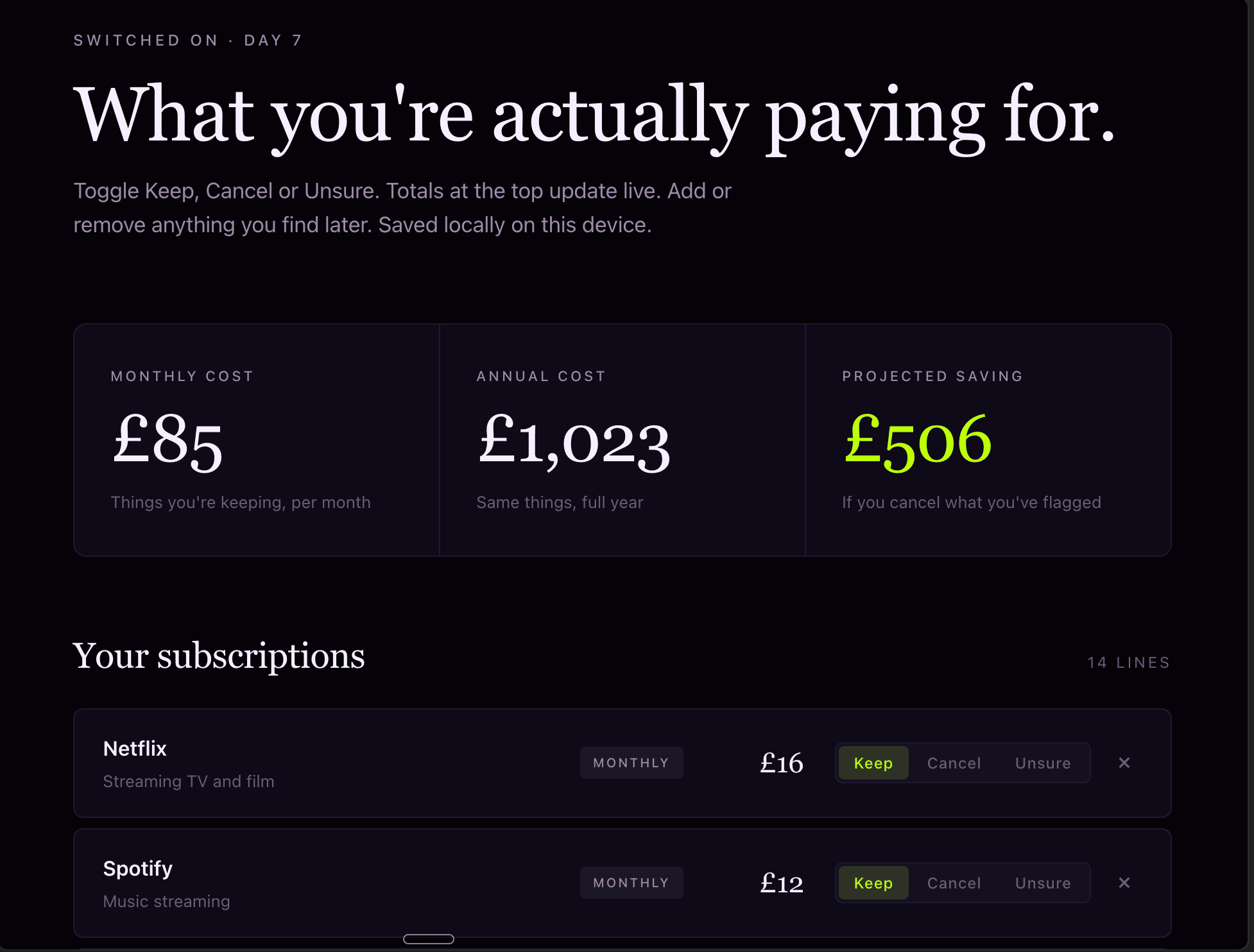
Claude builds it. Double-click the file to open it in your browser. Bookmark the tab. Next quarter, drop a fresh statement in, run the sweep, and ask Claude to update the dashboard with anything new.
This is the version of “tool” you’ll be building properly in Week 4. Today’s is your first one, in two minutes, without thinking about it.
A safety note
Granting Claude access to your inbox is a meaningful step. It’s also reversible.
What Claude can do with READ-ONLY Gmail access: read emails, search emails, summarise emails, extract information from them. That’s it.
What Claude CANNOT do with read-only: send emails on your behalf, delete emails, modify your inbox, change your account settings.
If at any point you want to revoke access:
In Claude: Settings, Connectors, Gmail, Disconnect.
In Google: myaccount.google.com, Security, Third-party apps with account access, find Claude, Remove access.
Both work. Either revokes immediately. Claude no longer reads anything new from your inbox the moment you disconnect. (Anything Claude already pulled into a previous chat is still in that chat history until you delete the chat.)
NEVER grant write access to your inbox unless you have a specific, well-understood reason. Read-only handles 95% of useful inbox tasks. Write access is rarely needed and creates risk.
What you’ll notice
The inbox catches what the statement couldn’t see. Often it’s the annuals: software you signed up for last year, a magazine subscription you forgot, an Apple One bundle, an Amazon Prime renewal, the gym membership you cancelled but didn’t actually cancel.
The cancellation total from today usually beats Day 5’s. That’s not because the statement was wrong. It’s because the statement only sees half the picture.
Cross-check is the move. Two sources for one truth.
Why this works
Aggregator merchants on a bank statement hide what they’re for. The renewal email never does. The email subject line is literally “Thanks for renewing your subscription to [actual brand].”
That’s why this works in a single sweep. The inbox holds the receipts. Claude reads them. You decide.
It’s also why connectors are the unlock people remember. Browser Claude is for thinking. Connected Claude is for doing.
Key takeaway
One connector. One brief. The annual subs your statement couldn’t see, surfaced and actioned. The Day 5 table, completed.
You now have a workflow you can run every quarter: bank statement + inbox sweep + aggregator check. Three sources, one decision pass, money back.
One week in. How’s it landing?
Quick favour before the weekend.
This is the end of Week 1. The hardest week of the challenge, if I’m honest. The setup days. The first proper task. The first connector. The bit where people decide whether AI is for them or not.
I want to hear how it’s going for you.
Whether you’ve done every day or you’re catching up. Whether you’ve had a wow moment or you’re still in the “this is fiddly” bit. Whether you’ve built something or you’re still finding your footing. All of it useful.
Three questions, if you’ve got a minute over the weekend:
What’s surprised you most so far? The thing you didn’t expect.
What have you actually built or done? Even tiny counts. Especially tiny.
What do you wish I’d told you on Day 0? What’s missing from the brief.
Hit reply on this email and tell me. Or DM me on Instagram. Or comment on the Substack post. They all come to me.
I’m reading every reply. I’ll fold what I learn into the rest of the challenge so the next two weeks land sharper for the women still finding their feet.
Where this is heading
You’ve crossed two thresholds in a week.
Browser to desktop. Statement to inbox. Both stay locked in.
Every wow day from here builds on both.
Tomorrow on Switched On
Day 8: Clear the inbox debt while the kettle boils.
Saturday edition. The personal mail you’ve been ignoring. The receipts. The booking confirms. The school forms. Same Gmail connector, different brief, twenty minutes between you and a backlog that’s finally handled.
Nishma x
P.S. How did today land? Three buttons, thirty seconds → Tap one
I read every response. The data shapes the rest of the challenge.
Catching up? Days 0 to 6 are on the Switched On Substack archive HERE.
Got a friend or a colleague who this might be useful for? Send her to nishma.co/30daychallenge
SwitchedOn #SwitchedOnAIChallenge