Welcome to Day 3 of the challenge.
A Sunday note before we start
The plan was to pause Switched On for the weekend and pick back up Tuesday, after the bank holiday. Then my inbox filled up with messages asking when the next one was landing. Weekend and heatwave ignored.
So here we are. On apparently the hottest day of the year. With Day 3. 🌞 😎
Zero pressure to do it now. Read it, save the email, come back to it Tuesday morning at your desk. The challenge will be exactly where you left it.
For everyone else: enjoy the sun.
Most of us prompt AI like we’re typing into Google. One go. One answer. Move on.
That’s the move that produces the most polite, most generic, most “yeah, this is fine” AI output. The kind that takes three rounds of edits to make actually useful.
Today changes that with one line, added at the end of every brief from here on.
A word before we start
You’ve got TCCA from Day 1. You’ve got the brief on you saved in Settings from Day 2.
Today is the smallest move of the week. One line. Free tier. Browser only. Five minutes.
But it’s the line that does most of the heavy lifting in any Claude conversation you have from now on.
The move: ask Claude five questions back
At the end of any brief, before you let Claude generate anything, add this:
Before you start, list 5 clarifying questions you need answered. Number them 1 to 5. Then I’ll work through them in order. No em dashes, no double-hyphens in your reply.
That’s it. That’s the move.
Claude lists all five questions up front. You answer them in order. Then it does the task.
(The “no em dashes, no double-hyphens” line is there because Claude’s default voice loves em dashes. If you don’t tell it not to, they’ll sneak into the questions and into the eventual draft. The double-hyphen line catches the obvious workaround.)
Why it works
Most bad AI output isn’t really an AI problem. It’s a brief problem. The thing you forgot to say. The assumption you didn’t realise you were making. The audience detail that lives in your head but didn’t make it into the prompt.
The five questions catch those. Claude is, honestly, a better question-asker than most work colleagues. It will ask things like:
Who is this for, specifically?
What does success look like?
What have you already tried?
What’s the tone you want?
Where will this be read?
Half the questions you’ll answer instantly. The other half you’ll realise you hadn’t actually thought about.
That’s the unlock. It’s not that Claude got smarter. It’s that you got clearer.
Try it now
Step 1. Pick a task you’d normally one-shot. Examples:
A LinkedIn post you’ve been drafting
A summary of a meeting you want to send your team
An email reply that’s been sitting in your drafts
A brief for a contractor or freelancer
Step 2. Write the brief however you’d normally write it. Use TCCA if you’ve got the structure. Don’t if you haven’t. The point isn’t to brief perfectly. The point is to brief honestly.
Step 3. Add this line at the very end of your prompt:
Before you start, list 5 clarifying questions you need answered. Number them 1 to 5. Then I’ll work through them in order. No em dashes, no double-hyphens in your reply.
Step 4. Send.
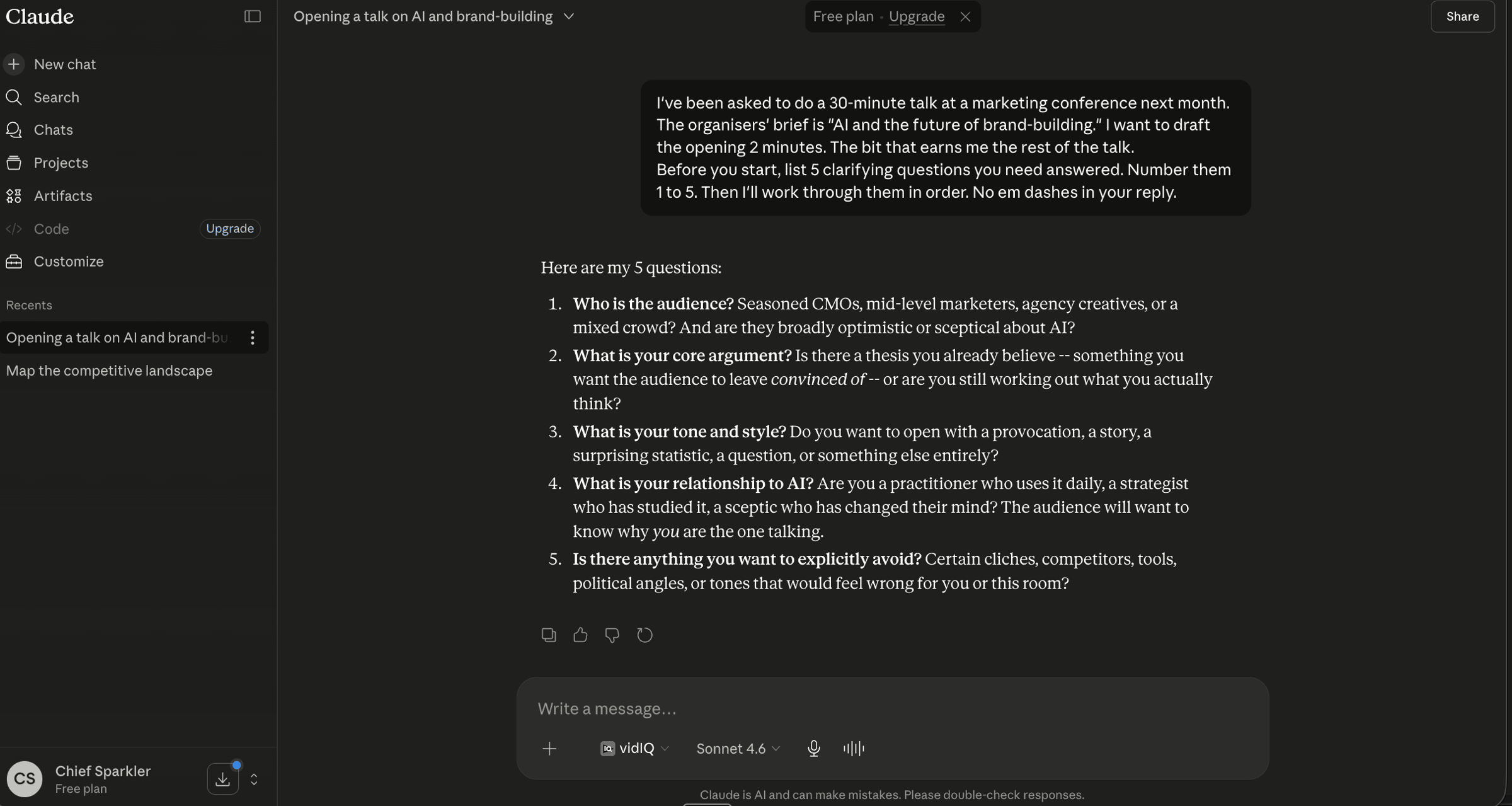
Step 5. Claude gives you all five questions in one numbered list. Read them. Answer them in order, in your next message. Be honest. If a question makes you realise you don’t actually know, say so. “I haven’t thought about that yet, what would you recommend?” is a fine answer. Often it’s the most useful answer.
Step 6. When the five are done, let Claude do the task. Notice how different the output is from your usual one-shot version.
What you’ll notice
The output is sharper. That’s the obvious win.
The less obvious one: you got sharper too. The five questions surfaced the ambiguity in your own thinking before Claude had a chance to guess wrong. Three rounds of edits collapsed into one conversation.
After a week of using this line, you’ll start asking yourself the questions before you even open Claude. The habit transfers. That’s the actual compounding.
A note for the keen
You can change the number. Three questions for small tasks. Ten for the big ones. The principle is the same: clarify before you generate.
You can also use this when you don’t even have a task yet. “I’m trying to decide whether to X. Ask me 5 questions to help me think it through. Then summarise back what you’ve learned.” Claude becomes a thinking partner, not a typing tool.
Key takeaway
One line at the end of every brief: “list 5 clarifying questions, numbered, then I’ll work through them in order. No em dashes.” Five minutes. Browser only. The fastest way to stop being the bottleneck in your own AI output.
Where this is heading
Three days in. You can brief AI on a task (Day 1). Claude knows the basics about you (Day 2). And from today, Claude clarifies before it generates (Day 3).
Tomorrow is the day Claude gets bigger.
Tomorrow on Switched On
Day 4: Cross the line. Browser to desktop.
We install Claude properly. Meet Cowork (the side of Claude that can read your files, not just your messages). Five minutes on which model to use when. Five minutes on what permissions to give and what to never give. By the end, Claude is set up for the wow days that start on Day 5.
About 15 minutes. Pro tier needed. If you’ve been on free until now, this is the upgrade moment.
See you.
Nishma x
Catching up? Day 0 to Day 2 can be found in the Switched On Substack archive HERE.
Got a friend or a colleague who this might be useful for? Send her to nishma.co/30daychallenge
SwitchedOn #SwitchedOnAIChallenge