

Day 20: Build the morning brief that runs itself.
You rebuild your day from scratch every morning. That reassembly is a job. Today you hand it to your first agent, a brief that runs itself.

Welcome to Day 20 of the challenge.
Every morning you rebuild the day from scratch.
Open the calendar. Scan the inbox for anything on fire. Try to remember the three things that actually matter today underneath the noise. You do it before you’ve properly woken up, and you do it again tomorrow, and the day after.
That reassembly is a job. And jobs can be handed over.
Today you build your first agent. Don’t let the word scare you. An agent isn’t code, and it isn’t clever. It’s just a job you set up once and get back done, again and again, without asking each time.
A word before we start
Every agent, however fancy it sounds, is five simple parts. Once you see them, the mystery goes.
The trigger: when it runs. The job: what it does. The context: what it reads to do it well. The output: where the result lands. And the guardrail: what it must never do.
That last one is the most important, and it’s the same line you drew on Day 16. Your morning brief drafts and summarises. It never sends, never replies, never deletes. It puts the day in front of you. You decide what to do with it. AI does the gathering. You stay the boss.
We build it in that order, and we test it by hand before we ever leave it alone.
Step by step
Step 1.
Make sure it can see your day. The brief is only as good as what it can read. If you connected Gmail on Day 7, that’s one source. A connected calendar is the other. If you haven’t connected your calendar, you can still do today, you’ll just paste your day in by hand.
Step 2.
Open Cowork in your desktop app, pointed at your Switched-On folder. Opus is fine here.
Step 3.
Build the brief and run it by hand first. This is the bit people skip and shouldn’t. See it work in front of you before you trust it. Paste this to Claude:
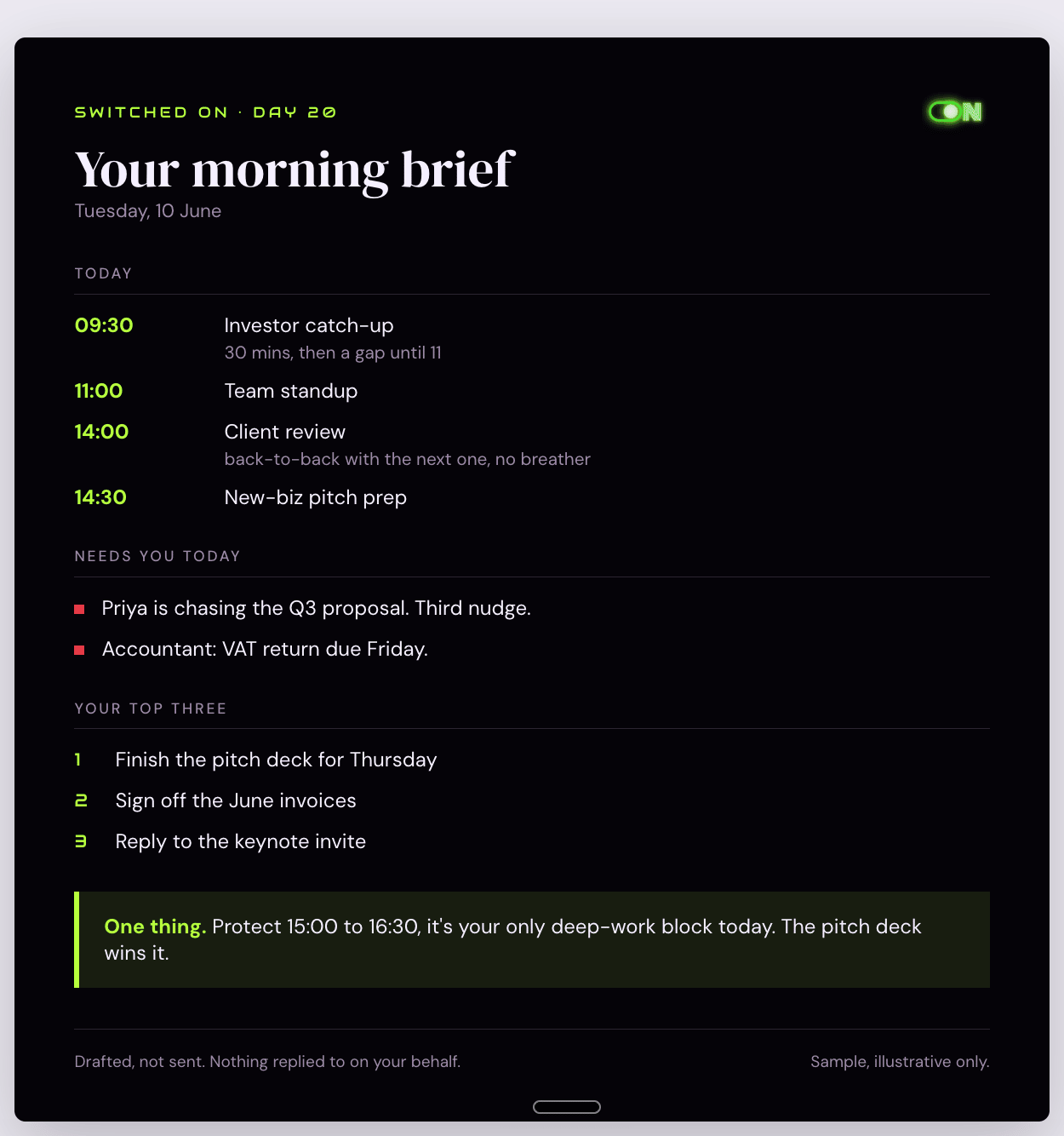
Build me a morning brief.
Read my calendar for today and tell me what’s on, back to back or with gaps.
Scan my inbox and flag only the few things that genuinely need me today, ignore the noise.
Then remind me of my top three priorities (you’ll find them in my notes, or just ask me).
End with one short nudge: the single most important thing to protect time for.
Keep it short enough to read standing up.
Draft only. Do not reply to anyone or send anything.
(If your calendar isn’t connected, start instead with: “Here’s my day: [paste your meetings]. Build me a morning brief from this plus my inbox.”)
Read what comes back. Tweak it. Too long? Say “shorter”. Missing something? Add it. Get it to the version you’d actually want first thing.
Step 4.
Save it as a job you can run with one tap. This is the version that works for everyone, today, no setup. Paste this to Claude:
Save that exact brief as a reusable prompt I can run each morning.
Write it into a file called morning-brief.md in my Switched-On folder, with clear instructions.
Then each day I can open a fresh chat, point at this file and say “run my morning brief”.
Now every morning is one line: “run my morning brief”. The job is built. You just press go.
Step 5.
Optional upgrade, if your app can schedule it. Some setups let you schedule a task so it runs on its own, before you’ve sat down. If yours does, set the morning brief to run early each weekday and land where you’ll see it. If it doesn’t, or you’re not sure, don’t worry. The one-tap version from Step 4 gives you almost all of the benefit with none of the fuss.
Two rules if you do schedule it. Keep the draft-only guardrail in the instructions, word for word. And learn how to switch it off before you switch it on, see the safety note.
Step 6.
Lock it in. Paste this to Claude:
Add to MEMORY.md: Day 20, built my first agent, a morning brief.
It reads my day and drafts a summary. It never sends or replies.
I run it with one tap, or on a schedule if set up.
A safety note
An agent that can act on your behalf is powerful, so keep the leash short, especially at the start.
DRAFT ONLY. Your morning brief reads and summarises. It does not reply, send, accept, decline or delete anything. Those words stay in the instructions. The day it starts doing things on its own is the day you lose track of what it’s doing in your name.
If you schedule anything, know how to stop it first. Find where scheduled or recurring tasks live in your app and check you can pause or delete one. Never start a job you don’t know how to switch off.
What you’ll notice
The first morning the brief is just there, you’ll feel the difference. No scramble. No five tabs. The day, already gathered, while you found your shoes.
You’ll also notice the quiet shift in how you think about AI. Up to now you’ve asked it for things. Now it’s started doing a small job for you, on repeat. That’s the door to the last stretch of this challenge.
Why this works
The morning scramble is small but it’s daily, and daily adds up. It’s also entirely made of gathering, checking the calendar, scanning the inbox, recalling the priorities, which is exactly the kind of fetch-and-summarise work AI does well and you do grudgingly.
Building it by hand first is the trick. You see exactly what it does, you shape it, and only then do you trust it to repeat. Trust is earned by watching, not by hoping.
Key takeaway
An agent is just a job you set up once and get back done. Five parts: trigger, job, context, output, guardrail.
Your first one is built. The morning, gathered for you. Draft only, on a short leash, switched on by one tap or on a schedule. You stay the boss.
Where this is heading
Friday tomorrow, end of Week 3. We slow down and put the whole brain to work on the third and sharpest way to use AI. The one we named on Day 16 but saved. AI as the one who argues back.
Tomorrow on Switched On
Day 21: Let Claude argue against you.
The decision you’ve been circling for three weeks. Tomorrow you settle it, with an honest opponent in the room.
Nishma x
P.S. How did today land? Three buttons, thirty seconds. Tap here
I read every response. The data shapes the rest of the challenge.
Catching up? Days 0 to 19 are on the Switched On Substack archive HERE.
Got a friend or a colleague who this might be useful for? Send her to nishma.co/30daychallenge
#SwitchedOn #SwitchedOnAIChallenge

Unsubscribe | Update your profile | 167-169 Great Portland Street, London, W1W 5PF
