Welcome to Day 2 of the challenge.
AI starts every conversation a stranger. That’s why the same prompt lands one day and falls flat the next.
Today changes that. Ten minutes. No install. No Pro needed. One short paragraph saved in Claude’s Settings, read by Claude on every new chat from here on.
This is the easy step that quietly powers the next 28 days.
A word before we start
Yesterday you wrote a brief for a task. Today you write a brief for the colleague.
If TCCA (our prompting framework - Task, Context, Constraints and Ask) was about telling AI what you want, today is about telling AI who’s asking. Same logic. Different layer. The brief on YOU sits underneath every brief on tasks from here on.
The move: a five-line paragraph, saved once, read forever
Claude has a place in Settings where you can save what you want it to know about you. Your role. Your audience. Your format preferences. Your tone. Your hard nos.
Save it once. Claude reads it on every new chat. You stop introducing yourself every five minutes.
The cleanest version is five lines. Less and Claude doesn’t have enough. More and you freeze trying to write it.
Step by step
Step 1. Open claude.ai in your browser. Sign in.
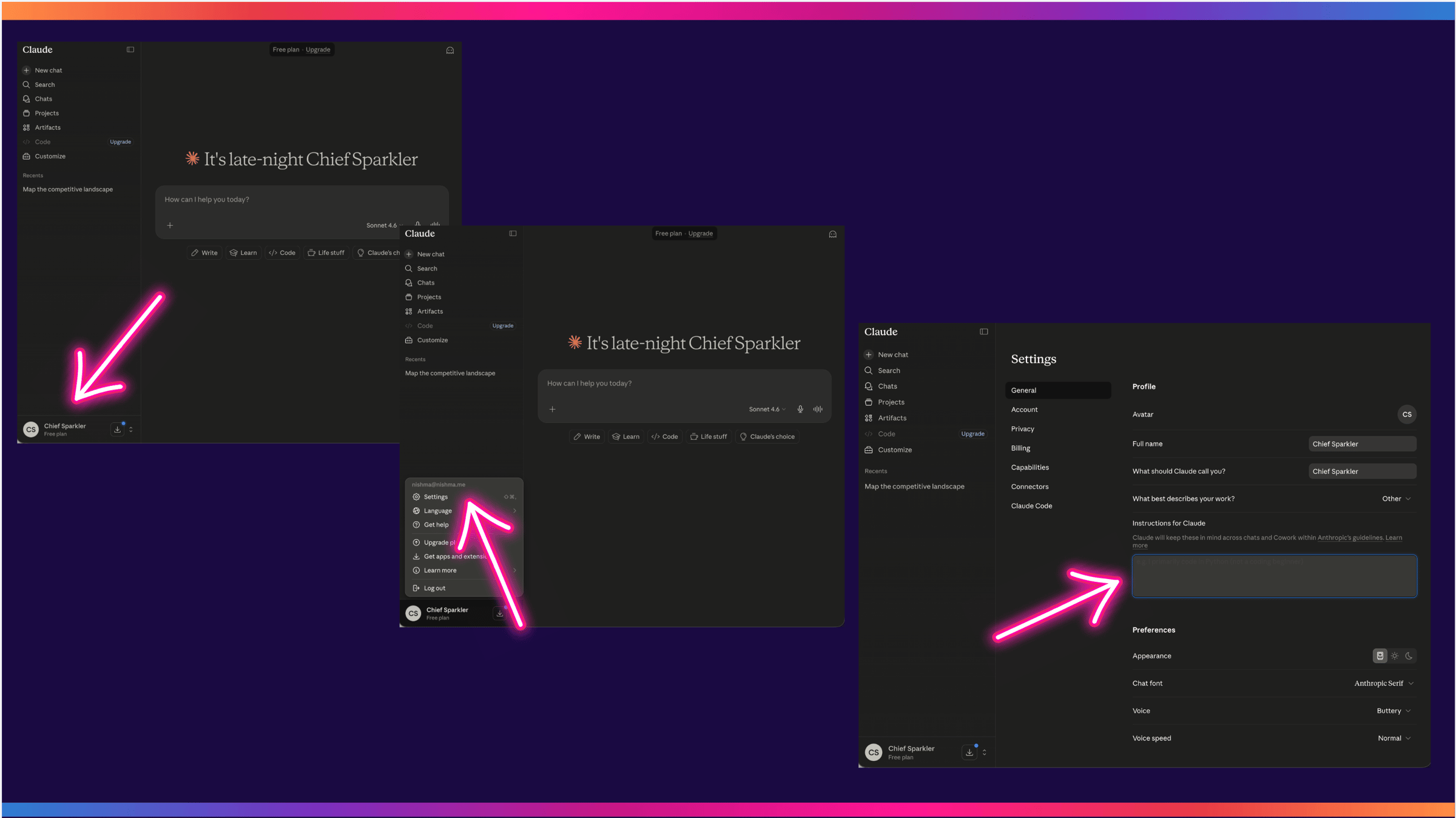
Step 2. Click your initials in the bottom-left of the sidebar, then Settings. You’ll land on the General tab (that’s the default). Scroll down to the box labelled “Instructions for Claude”. It sits just above the Preferences section.
(Anthropic shifts the labels now and then. If “Instructions for Claude” isn’t there, look for whatever box says Claude will remember this across chats. I’ve shared some screen grabs for as it is today).
I am [your role] at [your company / what you do]. I work mostly with [your audience: be specific. Not “marketers” but “CMOs at mid-size B2B companies”. Not “founders” but “Series A founders in fintech”.]
When you reply, default to [your length preference, e.g. “short and punchy, no preamble”, “bulleted and scannable”, “one paragraph then bullets”]. Use British English.
Match my tone: [pick three, e.g. “direct, warm, sceptical”, “dry, formal, occasionally playful”, “fast, opinionated, a bit cheeky”].
Never use the phrases [list 3 to 5 AI tells you can’t stand]. Examples to consider: “let’s dive in”, “in today’s fast-paced world”, “it’s not just X, it’s Y”, “I hope this finds you well”.
When I’m working through an idea, be a sparring partner. Find the weak spots, name the assumptions, push back where I’m thin on data. Don’t flatter me.
(Don’t forget Wispr Flow can make sharing these instructions even quicker than typing it all in!
Step 4. Save.
Step 5. Open a brand new chat. Not the chat you were in.
Step 6. Run this test:
Draft a LinkedIn post about something I’d actually post about.
If Claude pulls your audience, your tone, and the kind of work you do without you reminding it, the paragraph worked.
If Claude went generic, the paragraph needs more. Go back. Tighten the audience line. Add another banned phrase. Try again. Iterate until a fresh chat already sounds like it knows you.
What you’ll notice
Before today, every chat started with a few minutes of you explaining who you are, who your audience is, and how you want the reply to land. Bare minimum, every single time.
After today, none of that. You write the task. Claude already has the rest.
Every TCCA brief you wrote yesterday will land sharper for it. Every brief you write from tomorrow will land sharper still.
Why this works
The brief on you isn’t really about Claude. It’s about not starting from zero every time you sit down to think.
It’s also portable. The paragraph you wrote today works in ChatGPT, Gemini, Grok, and whatever comes next. Most AI tools have an equivalent settings field. The text moves. You don’t have to teach the next tool from scratch.
The brief is yours. Forever.
A note on going deeper
This is the lite version. Five lines, ten minutes, Settings.
Later we come back to it properly. The deep version is a 100-question interview that builds a full voice profile. The kind that captures not just what you do but how you think, what you’d never say out loud, the contradictions in your taste. That file travels with you to any tool. We use it for content. We use it for thinking. We use it for protecting the way you sound.
For now, today’s five lines are enough. Save them. Use them this afternoon on something real. Notice what changes.
Key takeaway
Stop introducing yourself to AI from scratch every time. One paragraph. Five lines. Ten minutes. The brief on you is the brief that outlasts the tool.
Where this is heading
Two days in. You can brief AI on a task (Day 1). Claude knows the basics about you (Day 2). The next few days build on both, one small move at a time.
Tomorrow on Switched On
Day 3: A small change to how you start any task with Claude. One line. Five minutes. Browser only. Free tier. The kind of move that doesn’t look like much until you’ve used it three times.
Catching up? Day 0 (setup post) and Day 1 (TCCA) are both on the Switched On Substack archive HERE.
Nishma x
Got a friend or a colleague who this might be useful for? Send her to nishma.co/30daychallenge
SwitchedOn #SwitchedOnAIChallenge