
Welcome to Day 16 of the challenge.
Yesterday Claude got to know who you are. Today Claude learns how you sound.
Today is also bigger than that. It’s the day we draw the line that protects everything from here on.
There’s a question every woman doing serious work with AI has to answer: when does AI get to write FOR me, and when does it only get to help me write? Most AI training skips this question. Most AI users default to “AI writes everything” and produce slop in their own name. Some go the other way and never use AI for any writing, leaving hours on the table.
Today we build the voice profile. AND we draw the line. The line is the more important teaching.
A word before we start
Voice is not an adjective. It’s a pattern.
How you open. How you close. The rhythm of your sentences. The vocabulary you reach for. The vocabulary you avoid. Where you’re specific. Where you’re general. Where you let a sentence run. Where you stop dead.
Most people asked to describe their voice write a list of adjectives (”warm, direct, no jargon”) and call it done. Claude can’t write to adjectives. Claude CAN read a pattern across ten examples and triangulate the real voice underneath.
Same move as Day 5: show, don’t tell.
Once we have the pattern in a file, the question becomes: when do we want Claude using it?
The Switched On line
Here’s the rule we’re going to hold for the rest of this challenge, and the rest of your AI use after.
Three modes. One bar.
AI as editor. When your voice IS the product.
LinkedIn posts. Substack essays. Instagram captions where personal brand is the point. Keynote scripts. Thought leadership. Anything published under your name where the writing IS the value.
In these moments, YOU author the words. Claude edits. Claude sharpens. Claude flags what’s lazy and what’s buried. You publish your own words, made sharper.
AI as author. When the work IS the product.
Proposals. Emails. Client follow-ups. Marketing collateral. Internal briefs. Decks. Operational comms. Anything where the THING being delivered is the work, not your voice on a page.
In these moments, Claude can draft. You sharpen and send. The voice profile means the AI-authored draft still sounds like you. But the writing isn’t the point. Getting the work done is. Important. AI drafting is permission to start. Not permission to ship. The quality bar doesn’t drop because something is “ops.” Sharpen the AI draft like you wrote it yourself. The minute you let “ops” mean “good enough,” AI slop creeps into your brand by the back door, one email at a time.
AI as challenger. When you need adversary thinking.
The decision you’ve been weighing. The post you’re not sure about. The argument you can’t quite land. Claude plays the difficult colleague your inner circle is too polite to be. AI argues against you. You decide.
This is the most powerful of the three modes for senior women in leadership. We come back to it properly on Day 22. Today we lay the foundation by building the voice profile that makes the adversary thinking land sharper.
The voice profile we’re building today serves all three modes differently:
For editor work, it makes Claude a sharper EDITOR - using your voice patterns as the editing standard.
For author work, it makes Claude a sharper GHOSTWRITER on the ops stuff - drafts arrive sounding like you, requiring less rewriting.
For challenger work, it gives Claude context for your actual defaults and blind spots, so the adversary thinking lands on YOU, not on a generic version of you. We demo this on Day 22.
One file. Three uses. One quality bar across all of them. The line is yours to hold.
A note on why this matters: the cohort members who get most from AI long-term are the ones who hold this line. The ones who don’t (who let AI write everything) produce content that sounds increasingly generic, lose trust with their audience, and end up paying more to dig out of the AI-slop hole than they ever saved.
You’re building the alternative. The version where AI gives you leverage on the work without taking your voice away.
Step by step
Part 1: Build the voice profile
Step 1. Gather ten pieces of writing you’re proud of.
Not the polished website copy. Real things you’ve written. LinkedIn posts that got reactions. A Substack essay you’d send to your mum. An email that landed. A section from a keynote. A long DM reply. Anything where you wrote it and thought “yeah, that’s me.”
Pick on the basis of bravery, not popularity. This is the one rule that matters today. The voice profile compounds whatever you feed it. If you train it on the safe stuff (the posts that got the most likes because they were inoffensive), you get safer AI output. If you train it on the brave stuff (the posts you nearly didn’t publish, the ones with the cleaner edge), you get bolder AI output. Most cohort members make this mistake. Don’t.
Ten is the sweet spot. Fewer and Claude over-fits to one mood. More and you lose specificity.
Paste them into a single text file. Label them lightly: “LinkedIn post about X (2025)” or “Email to client Y”. Just enough that Claude knows the format. Save to your reference/ folder as voice-samples.md.
Step 2. Open Cowork in your desktop app, pointed at your Switched-On folder. Opus for this one. Make sure CLAUDE.md exists at the top (Day 14 work).
Step 3. Paste this brief:
Read the file reference/voice-samples.md. These are ten pieces of writing I’m proud of.
Write me a voice profile. Cover, specifically:
1. How I open. Pattern, length, what I do in the first sentence. 2. How I close. Pattern, length, what I do in the final line. 3. Sentence rhythm. Short, long, mixed, where I let one run, where I stop dead. 4. Vocabulary I reach for. Words and phrases I use often. 5. Vocabulary I avoid. Words you can see I’d never use. 6. Where I’m specific. Numbers, names, places, examples. 7. Where I’m general. The territory I leave deliberately vague. 8. Where I’m vulnerable. The cracks I let in. 9. Where I’m confident. The places I plant a flag. 10. The tells that would make a friend say “that sounds like Nishma.”
Be ruthless. Don’t smooth me. Don’t sanitise. The non-obvious patterns matter more than the polite ones.
Save the output to the top of my Switched-On folder as voice-profile.md. Once saved, also update CLAUDE.md to reference it.
Step 4. Read the draft.
Two checks:
Does it match what you’d say if asked to describe your voice?
Does it include the non-obvious tells (the swearing, the structural quirk, the words you reach for that aren’t on the polished website)?
If yes, approve and save. If no, tell Claude what’s wrong. “You missed that I almost never use exclamation marks. I use full stops as percussion. Add that.”
Part 2: Test it in editor mode (voice work)
Now we test the voice profile against the line. First in editor mode - where YOU author and Claude edits.
Step 5. Pick a half-written LinkedIn post you’ve got lying around. Notes from a thought you’ve been meaning to publish. A rough draft. Voice notes you transcribed. Anything 100-200 words of your own writing that isn’t quite there yet.
If you don’t have one, take five minutes (Wispr Flow) and dictate one now. Real thought, half-formed.
Step 6. Start a fresh chat in your Switched-On folder. DON’T load the voice profile yet. Paste:
Here’s a half-written LinkedIn post. Edit it. Sharpen the hook, cut what’s flabby, strengthen the closing. Don’t rewrite. Edit. Keep my words where they work.
[Paste your draft.]
Read the edit. Note what Claude did.
Step 7. Start ANOTHER fresh chat. This time, make sure voice-profile.md gets read. Paste:
Read voice-profile.md before doing anything else. Then here’s a half-written LinkedIn post. Edit it the way I would edit it - using my voice patterns as the editing standard. Sharpen the hook, cut what’s flabby, strengthen the closing. Don’t rewrite. Keep my words where they work.
[Paste the same draft.]
Read this edit. Compare to the first one.
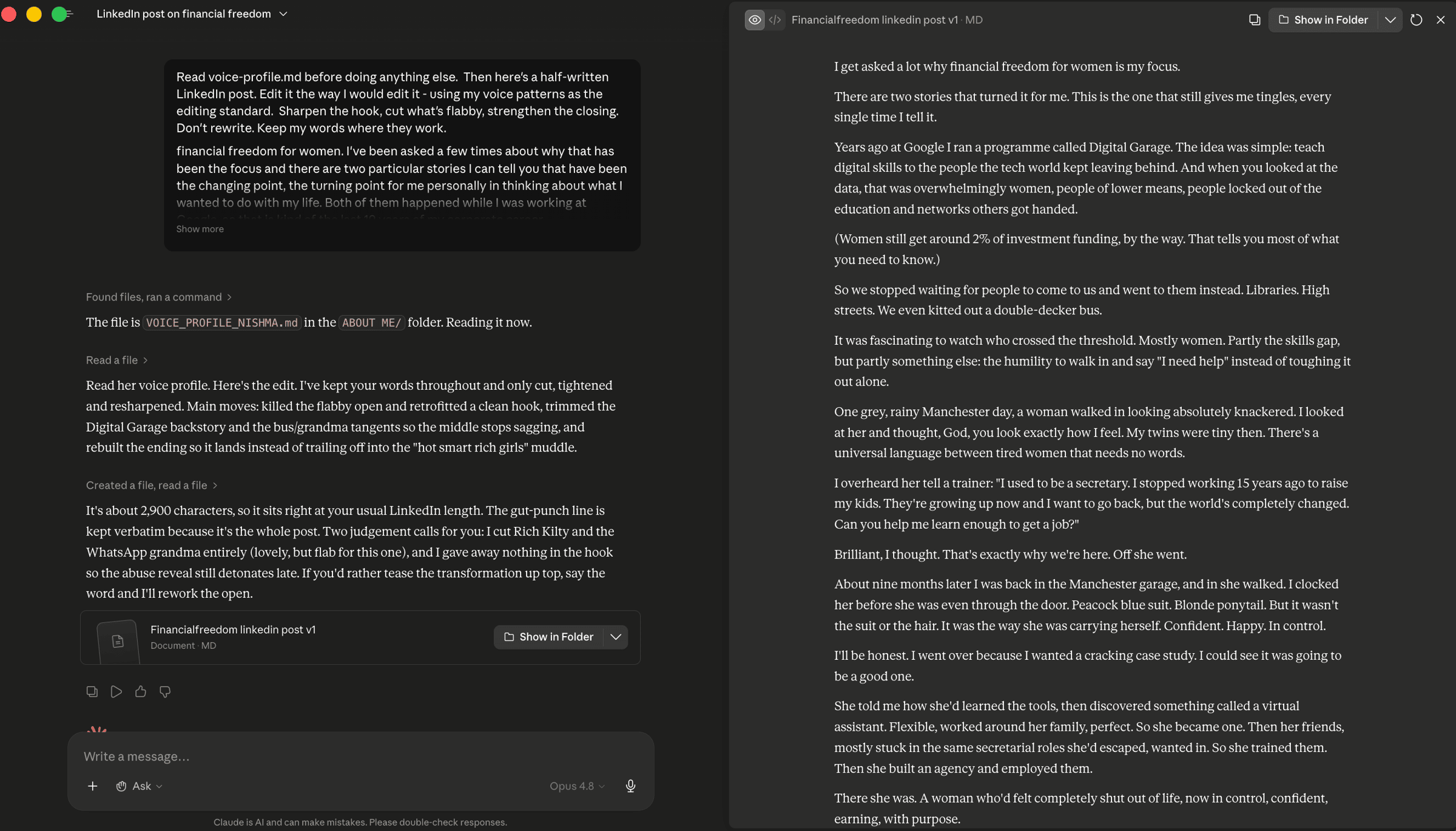
Step 8. Read both edits side by side.
The first edit will be technically competent. The second edit uses the same skills, but the cuts and suggestions land closer to what YOU would have cut yourself. The voice profile didn’t make Claude a better writer. It made Claude a better editor OF YOUR work.
This is editor mode. The thing you’ll do every time you publish something under your name. Your words, sharper.
Part 3: Test it in author mode (operational work)
Now we shift sides, where Claude authors and you sharpen.
Step 9. Pick a real operational task you need done. Examples:
A follow-up email after a meeting this week
The opening paragraph of a proposal you’re drafting
A LinkedIn DM you need to send to a connection
A short brief for a colleague
A holding email to a client who’s chasing
Something where the WORK is the deliverable, not your voice on a page.
Step 10. Start a fresh chat. DON’T load the voice profile yet. Paste your context and ask Claude to draft.
I need to send a follow-up email after a client meeting. Context: [3-4 lines about the meeting, what was agreed, what needs to land in the email]. Draft it.
Read the draft. Note how generic it sounds.
Step 11. Start another fresh chat. Load voice-profile.md. Paste the same brief.
Read voice-profile.md before doing anything else. Same task: a follow-up email after a client meeting. Context: [3-4 lines]. Draft it in my voice.
Read this draft. It will be much closer to something you’d actually send. Sharpen the last 10%, send it, done in five minutes instead of thirty.
This is author mode. The thing you’ll do for proposals, emails, marketing collateral, internal docs. The operational writing where AI gives you back hours without taking your voice away.
Step 12. Save the comparisons and lock in the lesson.
Ask Claude:
Save the four comparison drafts to outputs/2026-XX-XX_voice-profile-test/ The two editor-mode edits (with and without voice profile) and the two author-mode drafts (with and without voice profile). These are my evidence of what voice-profile.md actually does.
Then update MEMORY.md:
Day 16: built voice-profile.md and tested it in both editor and author mode. The rule from here: Voice work - I write, Claude edits. Operational work - Claude drafts, I sharpen. The voice profile makes Claude better at both, in different ways.
A safety note
The voice profile is yours. Treat it as part of your brand asset library.
If you ever change roles, rebrand, or radically shift register (your post-corporate voice will differ from your corporate one), rerun the voice profile from 10 new examples. Your voice evolves; the file should too. Once a year is enough for most.
On the framework itself: the line you draw across all three modes is the safeguard against AI slop. Hold it. The day you start letting AI author your social posts is the day your audience starts to feel the difference, even if they can’t name it.
What you’ll notice
The editor demo is where your protection lives. AI editing your voice work is faster and sharper than editing it alone, but the work is still yours. You publish your own words.
The author demo is where the hours come from. AI drafting your proposals and emails saves you the blank-page friction on the work that doesn’t need to be a piece of YOU. The voice profile means those drafts arrive sounding like you, requiring minutes of editing rather than hours.
Most cohort members feel relief at the framework before they finish reading this. The relief is the answer to a question you’ve been sitting on: “How much should I let AI write?” The answer is now specific. Depends what kind of writing it is. Use the line.
Why this works
Voice is the pattern across many pieces, not the description of one. The traditional brief (”write in my voice, which is warm and direct”) fails because warm-and-direct describes a thousand people. The pattern-from-examples brief works because it captures what’s actually only true of you.
That makes the voice profile useful in both modes. As an editing standard (editor mode), the file gives Claude a benchmark for what “good” looks like. As an authoring style (author mode), the file gives Claude a starting voice that’s closer to yours from the first draft.
The line itself, when to use which mode, is the more durable teaching. AI is changing every six months. The author/editor line will be the same in 2030 as in 2026.
Key takeaway
Voice profile saved to the spine. Three modes named. Two demoed today, the third coming on Day 22.
AI as editor on the voice work: posts, essays, anything published under your name. You write. AI sharpens.
AI as author on the operational work: proposals, emails, marketing collateral, internal docs. AI drafts. You sharpen and ship to your own bar.
AI as challenger on the thinking. When you need adversary perspective. Demo on Day 22.
Three modes. One quality bar. The line is yours. Hold it.
Where this is heading
You’ve now got two brain files at the top of your Switched-On folder: about-me.md (who you are) and voice-profile.md (how you sound). Both read on every session. Both compounding.
Tomorrow is the third. The most consequential for marketing.
Tomorrow on Switched On
Day 17: Stop writing to demographics. Write to her.
Pick one real woman in your audience. Not a persona. A real person. Tomorrow Claude interviews you about her. The file that comes out changes how you write to anyone, across all them.
Nishma x
P.S. How did today land? Three buttons, thirty seconds → Tap one
Catching up? Days 0 to 15 are on the Switched On Substack archive HERE.
Got a friend or a colleague who this might be useful for? Send her to nishma.co/30daychallenge
SwitchedOn #SwitchedOnAIChallenge